Aftershoot vs Narrative

Narrative vs Aftershoot. Which AI Culling Tool Is Right for You?

Aftershoot is best known for its set and forget culling, whereas Narrative offers a faster, more intuitive photo selection and culling process, that doesn’t leave you second guessing.

What is Aftershoot?

Aftershoot is an AI-powered photo culling and editing tool designed to speed up post-production for photographers. It automatically detects factors like blur, closed eyes, and facial expressions to help select the best images from a shoot. Aftershoot also offers AI-assisted editing based on Lightroom adjustments, applying a trained style to new photos.

🔥 Key Strengths and Differences

  • AI culling focus: Aftershoot is primarily designed to speed up photo selection, automatically detecting factors like blur, closed eyes, and facial expressions to help identify the best shots.

  • Adaptive AI learning: Aftershoot’s AI learns from your culling and editing choices, gradually prioritizing what matters most to your style.

  • Unlimited pricing model: Aftershoot offers unlimited AI Editing, which some users prefer over per-image pricing.

  • Offline functionality: The software operates locally on Windows and macOS, meaning images don’t need to be uploaded to the cloud for processing.


🥀 Key Weaknesses

  • Missed emotional details: Aftershoot can overlook subtle expressions or emotional moments, meaning users often need to manually review selections.

  • Occasional burst/grouping errors: Its automatic grouping of similar shots can misfire in tricky lighting or with similar poses.

  • Limited creative control: Automated edits and selections not only restrict creativity, many users report having to go back through their images for any missed shots.

  • Editing Accuracy: AI edits vary in accuracy depending on lighting conditions and how well the profile is trained, and users commonly report needing to manually correct a portion of the results.

  • Processing time: Enabling face/eye detection slows imports and requires more processing time.
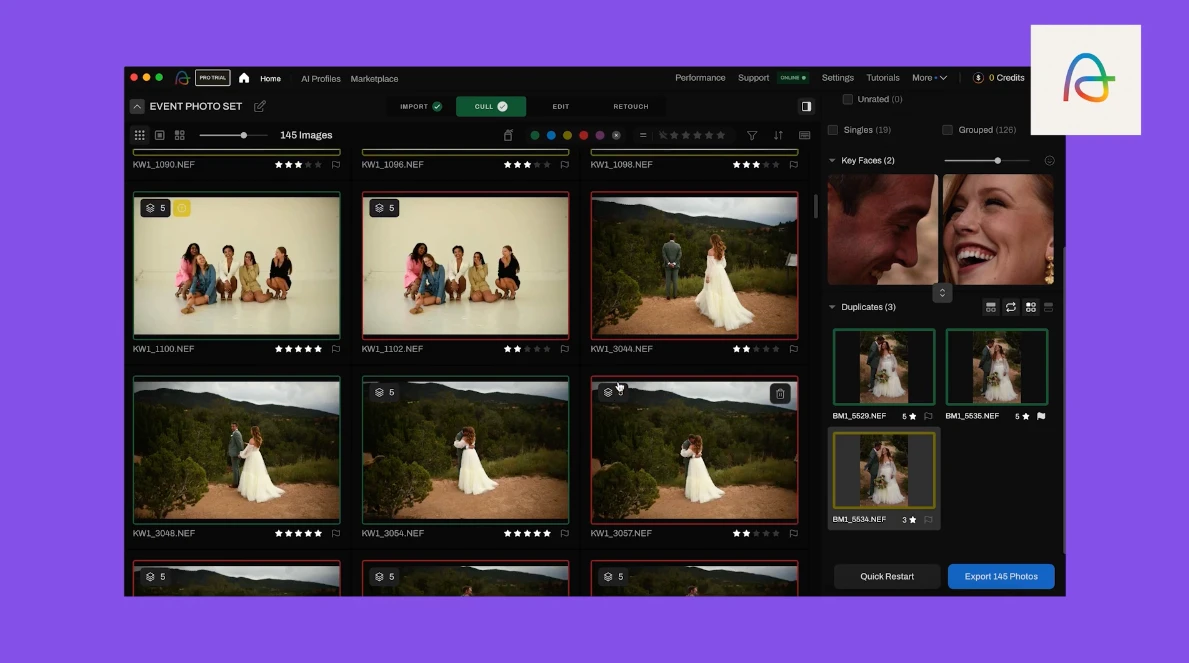


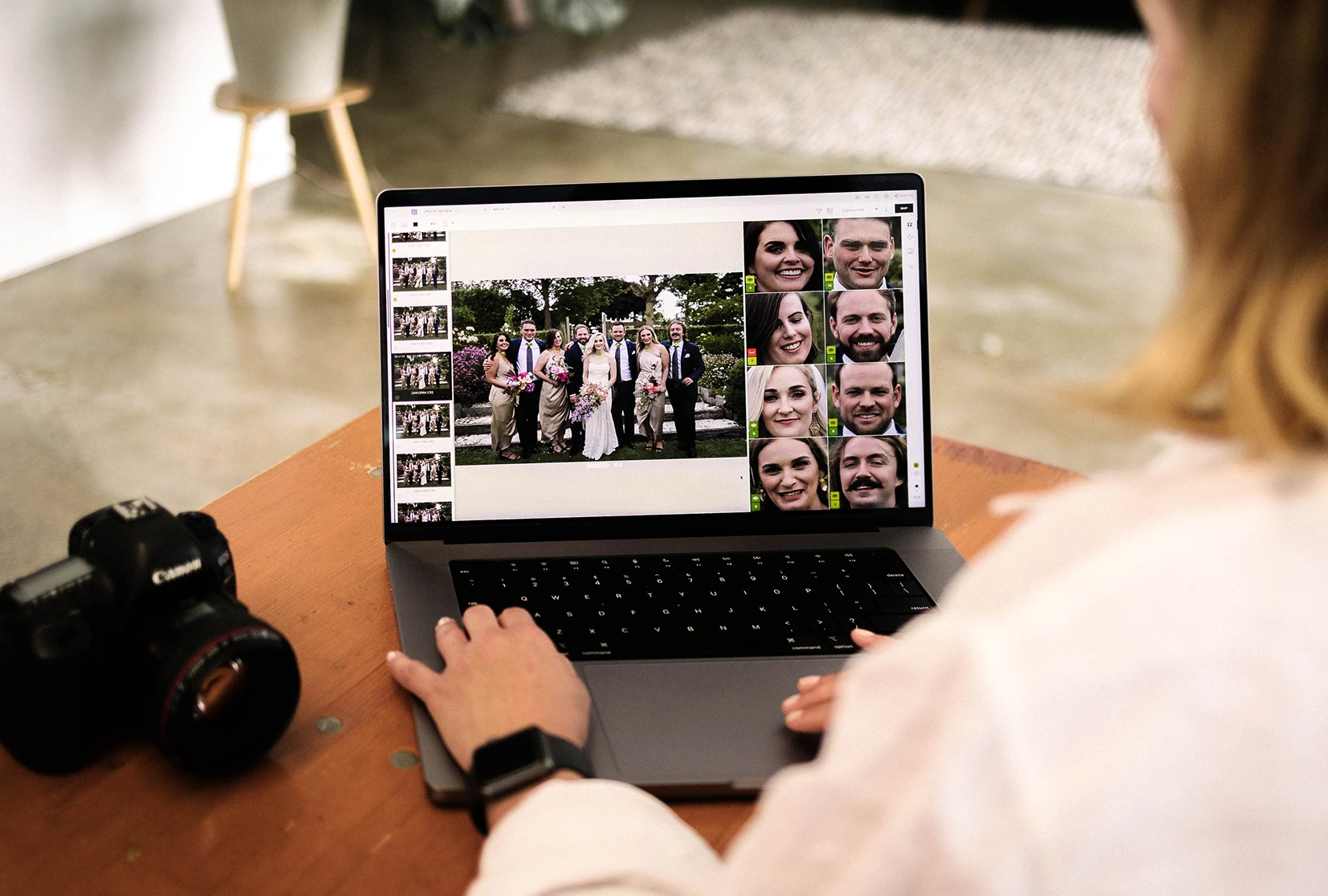
A screen capture of Aftershoot's culling feature

What Is Narrative?

Narrative is a professional AI photo culling tool designed by photographers, for photographers. Unlike Aftershoot, which automates culling and learns to apply your editing style on its own, Narrative's AI sorts, ranks, and explains its reasoning, evaluating focus and every face in a group shot, but leaves the final selection to you.

With Narrative, you move through a shoot in a fraction of the time and export straight to Lightroom, still holding full creative control over what makes the cut.

Why Photographers Choose Narrative Instead

  • Best-in-class culling: Narrative is purpose-built to make image selection fast, intuitive, and accurate—with tools like Eye & Focus Assessments, Close-ups, and Scenes.

  • Editing that fits your workflow: Narrative doesn’t replace Lightroom—it speeds up your editing workflow and sends edits straight into Lightroom.

  • Creative control: Narrative speeds up culling and editing with an AI assisted workflow that gives you creative control.

  • Offline support: Work anywhere, no internet required.

  • No friction, no cloud uploads: Narrative works locally, with seamless performance.

Narrative is an AI-powered photo culling tool built specifically for professional photographers. It helps you go from thousands of raw shots to a curated selection in minutes — and seamlessly integrates with Lightroom for final editing.
Narrative
Aftershoot
AI assisted culling

Human-led. You’re in control

AI-led. You review

Speed of import & rendering

⚡ Instant

Fast

Scenes View
People Filter
Close-ups Panel
Integrates with Lightroom

1-click

More than 1-click

Cull + edit pricing

Unlimited from $20 p/m

Unlimited from $40 p/m

Final Verdict: Narrative Delivers Smarter, Faster, and More Creative Workflows

Aftershoot and Narrative both use AI to speed up photo selection and editing, but Narrative clearly stands out for professional photographers who want speed, accuracy, and full creative control.

Aftershoot emphasizes automation and speed, but it can miss emotional nuances, group similar shots incorrectly, and produce generic-looking edits. Narrative, on the other hand, keeps you in the driver’s seat: you get precise culling tools like Eye & Focus Assessments, Close-ups, and Scenes, along with AI editing that adapts to your personal style over time.

Narrative works entirely offline, letting you import thousands of RAW files instantly, make creative decisions in real-time, and send edits straight into Lightroom without friction. Its unlimited AI culling and editing, combined with hands-on control, ensures you never lose the personality and emotional depth in your photos.

For photographers who shoot high volumes or want predictable results with full artistic freedom, Narrative offers the smarter, faster, and more reliable solution.

Experience it for yourself — try Narrative free today and see why it’s the best culling and editing software on the market.

Let great work flow

Cull and edit with AI. Keep creative control.

Narrative | Cull and edit with AI. Keep creative control.

Frequently Asked Questions

Both use AI to speed up culling and editing, so the real difference is philosophy, not features:

  • Aftershoot frames control as reassurance, promising the AI won't take over.

  • Narrative is built on the belief that interpreting a photograph is something only a photographer can do, so the AI is designed to support that judgment rather than stand in for it.

Accuracy for either tool depends on lighting, shoot complexity, and how well the AI has been trained on your style, so a single number doesn't tell the full story. What matters more is what happens with a borderline shot: Narrative surfaces its assessment (focus, expression, framing) and leaves the call to you, rather than filtering it out before you see it.

Yes. Both culling tools process images locally rather than uploading to the cloud, so neither requires a stable internet connection to cull or edit. This matters most for photographers working on location or traveling right after a shoot.

The two use different pricing models: Aftershoot prices its culling, editing, and retouching tools separately or bundled, while Narrative is structured across Lite, Standard, Premium, and Ultra tiers.

Yes. Your RAW files and Lightroom catalog are yours regardless of which culling tool you use, so switching doesn't mean starting over or losing past edits.

Narrative's culling features such as Scenes View, Close-Ups Panel and AI First Pass are built specifically for moving through high-volume shoots without losing the ability to check individual faces and expressions. Whether that fits better than Aftershoot's automated grouping depends on how much manual review you want in the loop.

Yes. Narrative sends selects and edits in one-click directly into Lightroom Classic on both Mac and Windows, plus Lightroom CC and Photoshop. It also ships directly to Capture One on Mac, so photographers working across either ecosystem can move from culling straight into editing without manual re-importing.

Narrative's position is that AI should never replace your ability to decide whether a photograph is worth keeping. It can be efficient and accurate, but the interpretation stays yours. That's the line the product is built around, not just a marketing claim layered on afterward.

Narrative
Imagen
Culling control

You’re in control

Black box

Culling speed

⚡ Instant

Moderate

Culling features

Best in class

Limited

User interface

Clean and clear

Takes time to learn

Learning curve

Intuitive

Slow set up

Lightroom integration

1-click

A lot more than 1-click

Cull + edit pricing

Unlimited from $20 p/m

Unlimited from $129 p/m

By continuing to use this site, you agree to the use of cookies.