Closed Eye Detection Software For Photographers: Find Blinks Before You Deliver

Elli Kim Content
Friday, September 18, 2026
Every photographer knows the moment. A gallery goes out, the client loves it, and then someone spots the one shot with a blink, often the hero image from a group photo. Closed eye detection software exists to catch that frame before it ever leaves a hard drive.
Detection vs. generative fix
Detection is the better fit for professional delivery, where image authenticity matters. Generative eye-opening adds pixels that were never captured, and most wedding and portrait photographers won't accept that tradeoff on a paid delivery. That's part of why photographers shoot in bursts in the first place: with enough frames of the same moment, culling software can usually find the one where every eye was already open, so no synthetic fix is needed.
The distinction here works the same way it does for AI photo culling versus AI photo editing generally. One sorts through what a photographer already shot. The other changes it.
How closed eye detection works
Modern closed eye detection runs a face detection pass first, then scores each detected face independently for eye openness. The underlying models have reached a high degree of accuracy in controlled conditions: research published in Scientific Reports found that Vision Transformer and Swin Transformer models achieved 99.15% and 99.03% accuracy respectively when classifying open-eye and closed-eye images using the MRL Eye Dataset. A modified AlexNet-based deep convolutional neural network similarly achieved 97.93% accuracy, 98.74% sensitivity, and a 99.69% AUC when distinguishing open from closed eyes in the Closed Eyes in the Wild dataset.
Real-world photography introduces more complexity than benchmark datasets. Partial blinks, squints during laughter, heavy glasses frames, profile angles, and strong catch-light reflections all create ambiguity. That's reflected in the research: a 2025 systematic review of deep learning approaches to blink detection screened 2,312 records and selected just 48 studies for analysis, while identifying RT-BENE - a benchmark containing more than 200,000 annotated eye images, including over 10,000 closed-eye images - as a key reference dataset. The breadth of that search shows how actively researchers are still refining the problem.
What to look for in a closed eye detection tool
The strongest closed eye detection tools share a few practical qualities:
They work on RAW files directly, without a conversion or export step first.
They integrate with the software already in use, whether that's Lightroom Classic or Capture One.
They surface results in a clear visual interface rather than burying them in a settings menu.
They let a photographer review flagged images before anything is rejected, so the photographer stays in control of every call.
They process large batches fast enough that review isn't slower than a manual cull would have been.
What separates strong closed eye detection tools from basic ones
Multi-subject frames add another layer of difficulty. A group shot of eight people is harder to judge than a single portrait, because the software has to check every face on its own, and just one closed eye can be enough to flag the whole photo.
Not every closed eye is a mistake, either. A sleeping newborn, a candid moment mid-blink during a first kiss, or a deliberately artistic shot can all include closed eyes a photographer wants to keep. Software that treats every closed eye as a mistake will flag exactly the photos a photographer meant to shoot.
The stronger tools give each photo a confidence score instead of an automatic yes-or-no rejection, and leave the final call with the photographer.
Comparing closed eye detection across culling software
Several culling tools now build closed-eye and blink detection into a broader image-quality check, rather than offering it as a standalone feature.
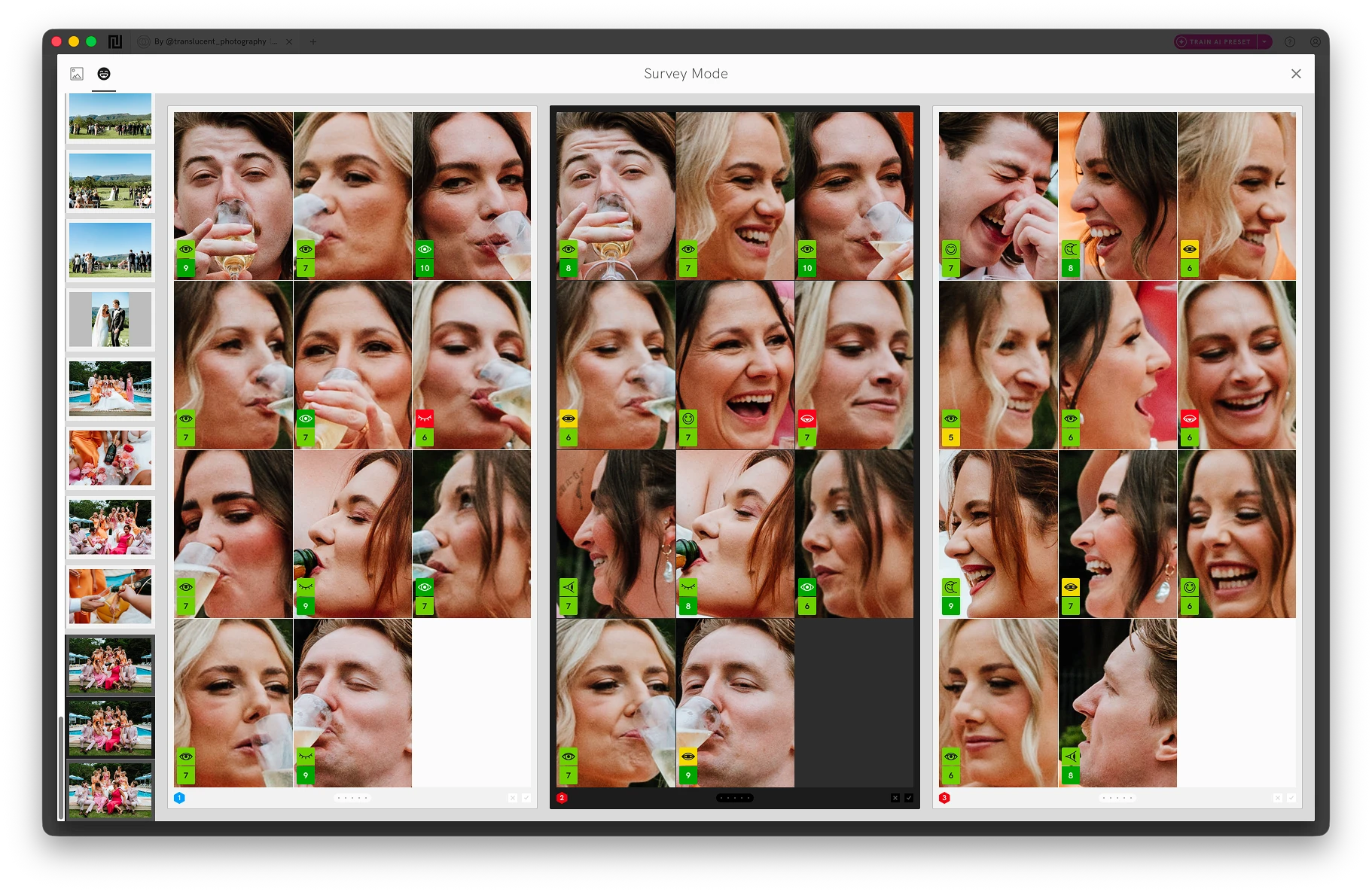
Narrative evaluates every face in a photo through Face Assessments. Its Close-Ups Panel shows simultaneous close-ups of every person in a frame, up to 24 faces at once, so a photographer can spot a blink without zooming into each face individually.
Narrative's AI First Pass runs an initial sort across a shoot, so the obvious blinks are already separated out by the time a photographer opens the Close-Ups Panel. It also takes context into account: a closed eye during a posed portrait is scored differently than one during a candid moment or a sleeping newborn, and nothing is rejected without a photographer seeing it first. For a closer look at how that fits into a broader post-production process, see how Narrative streamlines the culling and editing workflow.

Aftershoot flags closed eyes as part of its broader AI culling pass alongside blur and duplicates, and lets a photographer adjust how aggressively it flags them, which matters for genres like newborn photography where a closed eye is often the exact shot a photographer wants to keep.
FilterPixel identifies every face in a frame and flags blinks, closed eyes, and distracted expressions on every image it processes, as one part of its focus and exposure scoring.
Imagen AI builds closed-eye detection into its cloud-based culling workflow, and lets photographers restore shots where closed eyes were intentional, such as a kiss or candid moment, alongside face recognition for grouping duplicates and a feature that targets an exact final gallery size.
None of these tools generate new pixels. They flag and sort what was actually captured, which is the distinction that matters most for a professional delivery.
See how each tool compares in our breakdown page.
Why generative eye-opening isn't the answer
Sometimes, there's a group photo where every other element works and no alternative frame exists. Even in that specific occasion, for most professional deliveries, generating open eyes over a closed-eye frame isn't a solution. Any generative edit adds pixels that weren't in the original capture, and profile angles, unusual lighting, glasses, and children's faces all produce less reliable results. That's a real cost on a wedding or portrait gallery, where authenticity is often part of what a client is paying for.
The more defensible fallback is what photographers usually mean by "photoshopping" an eye: compositing a second real frame of the same person, shot moments apart with their eyes open, into the first, rather than generating a new one from scratch. The pixels are still genuinely captured, just from a different frame in the sequence. It only works if a usable second frame actually exists, which is true for a static pose more often than not, but not for something genuinely singular like the exact instant of a first kiss.
That's the stronger argument for getting the cull right in the first place: shooting in bursts raises the odds a clean frame exists somewhere in the sequence, so there's less need for a fallback at all.
Where closed eye detection fits in a workflow
Closed eye detection earns the most value early in post-production, not at the end. Running a face assessment pass right after import means a photographer sorts out blinks before spending time on color grading or edits that might get thrown away anyway.
Photographers using Narrative report saving an average of 253 hours a year across their culling workflow as a whole, of which catching blinks and closed eyes early is one contributing part, not the whole story.
Good culling software surfaces these issues without making the decision for the photographer. The strongest tools present flagged images in a review queue, let a photographer adjust how strict the flagging is, and leave the final call in human hands.
Start a free trial today to see how Narrative handles your own galleries.
Frequently asked questions
What software detects closed eyes in photos? Culling software with dedicated face and eye assessment, including Narrative, Aftershoot, Imagen AI, and FilterPixel, flags closed-eye frames across a shoot so a photographer can review and reject them. These tools score every detected face for eye openness and surface the ones where a face's eyes look mostly or fully closed, rather than deleting anything automatically.
Can AI open my eyes in a photo where I blinked? Yes, for a single photo. Tools built for generative editing, such as Evoto, detect a closed or squinting eye and generate a new, open-eyed version of it. That's a different job from culling software: it edits one photo after the fact rather than helping a photographer find a better frame from what was actually captured.
Can detection software tell a blink from a squint, or a deliberately closed eye? This is where tools differ most. A basic tool flags any low eye-openness score, so a genuine squint during laughter gets flagged the same as a real blink. Better tools score how confident they are and add a review step instead of auto-rejecting, and some read context, recognizing that a closed eye during a sleeping-newborn pose or a first kiss usually isn't a mistake.
Does closed eye detection work on RAW files? Narrative processes RAW files directly, with no export step required first. Most professional culling tools handle RAW in some form, though it's worth confirming directly with each vendor, since processing methods vary.
How do I check thousands of wedding photos for blinks? Import the shoot into a culling tool with face assessment built in. Run First Pass to get an initial sort, then open the Close-Ups Panel to review the flagged frames. A photographer still makes every final call, but the manual scanning gets cut down to a review pass instead of a first pass.
Content