Wedding Photography Workflow: What to Automate From Enquiry to Delivery


Elli Kim Content
Tuesday, November 10, 2026
A wedding photography workflow has eight stages: enquiry, planning, the wedding day, backup, culling, editing, delivery and follow-up. Most of the admin around them can run on its own. The creative decisions can’t, and shouldn’t.
This guide goes through each stage in order. For each one, you’ll see what to automate, what to keep hands-on, and where the job hands over to the next tool. If you’re comparing specific tools and prices, see the software stack every photographer needs.
Why a repeatable workflow matters
Most photographers are self-taught, so every workflow looks a little different. The ones that last have one thing in common: every couple gets the same experience, whether the day went perfectly or the rain came in sideways.

“If one client gets treated one way because you enjoyed the shoot and another client gets treated another way because you didn’t, then there is no longevity in your career,” says wedding photographer Miles Witt Boyer.
Automation is how you keep that consistency in peak season, when you’re shooting three weddings a week and answering enquiries at midnight.
At a glance: what to automate at each stage
Stage | Automate | Keep hands-on | Tool type |
|---|---|---|---|
1. Enquiry and booking | Auto-reply, brochure, contract, invoice, payment reminders | The consult call | CRM |
2. Planning | Questionnaires, timeline reminders | Reviewing the timeline with the couple and planner | CRM or scheduler |
3. Wedding day | Sneak-peek transfer to phone | Everything creative | Camera app |
4. Backup | Import rules, second copy to cloud | Checking the copy before formatting cards | Backup software and cloud storage |
5. Culling | First pass, focus and eye checks, grouping similar shots | The final story | AI culling software |
6. Editing | Baseline edit in your style | Hero images and fine retouching | AI Presets in Lightroom Classic or CC |
7. Review and delivery | Gallery upload, delivery email, print store | Album design choices | Gallery and proofing platform |
8. Follow-up | Review request, referral email, anniversary email | Personal thank-you | Email marketing |
1. Enquiry and booking
The fastest reply often wins the booking. A CRM built for photographers, like HoneyBook, Dubsado or Studio Ninja, can answer every enquiry straight away and move each couple through contract, invoice and payment without you chasing anything.

Automate: the enquiry auto-reply with your pricing guide, contract sending, invoices and payment reminders.
Keep hands-on: the consult call. That’s where couples decide whether they trust you.
2. Planning
A wedding day only runs smoothly if the planning is done well before it. As Narrative founder James Broadbent puts it, the job is “about all the things that you need to do upfront so you are positioned to be able to capture that moment.”
Automate: questionnaires sent at a set number of weeks before the date, and reminders for the shot list and timeline.
Keep hands-on: reviewing the timeline with the couple and their planner. Spot the tight windows (family formals, golden hour) before the day, not during it.
3. The wedding day
There’s nothing to automate in the creative work. There is one easy win: sneak peeks. Miles sends a few images from his camera to his phone over Bluetooth and emails them to the couple as they walk back up the aisle. Guests who couldn’t make it see the day within minutes, from the photographer, not from a blurry phone shot.

4. Backup
This is the least exciting stage, and the one you can’t skip. Keep a minimum of two copies in two places, such as an external drive and cloud storage, before any card gets formatted.

Automate: import presets, a consistent folder and file naming system, and a scheduled cloud sync.
Keep hands-on: confirming the copy finished before you format the cards. For a step-by-step setup, see the best way to back up your photoshoot.
5. Culling
Culling is where a wedding becomes a story. It’s also where many photographers lose a full day per wedding, scrolling through thousands of near-identical frames.
“The perfect selection is the least amount of images that tells the perfect story,” says James. “A gallery delivered with a lot of repetition loses its impact and power.”
AI-assisted culling handles the repetitive checks so you can focus on that story. In Narrative, every image is assessed on import:
AI First Pass compares each photo with the others in its Scene and labels it, from Best in scene down to Undesirable. A low label never rejects or deletes a photo.
Scenes split the shoot up, so each photo is ranked against similar frames, not the whole wedding.
The Close-ups panel enlarges every face with its eye and focus assessments, so you can check a group shot without zooming in by hand.
People Filter shows every photo of one person, or of the couple together, so you can check coverage. Key People Highlighting marks the key people in Close-ups, and it turns on automatically for wedding and event shoots.
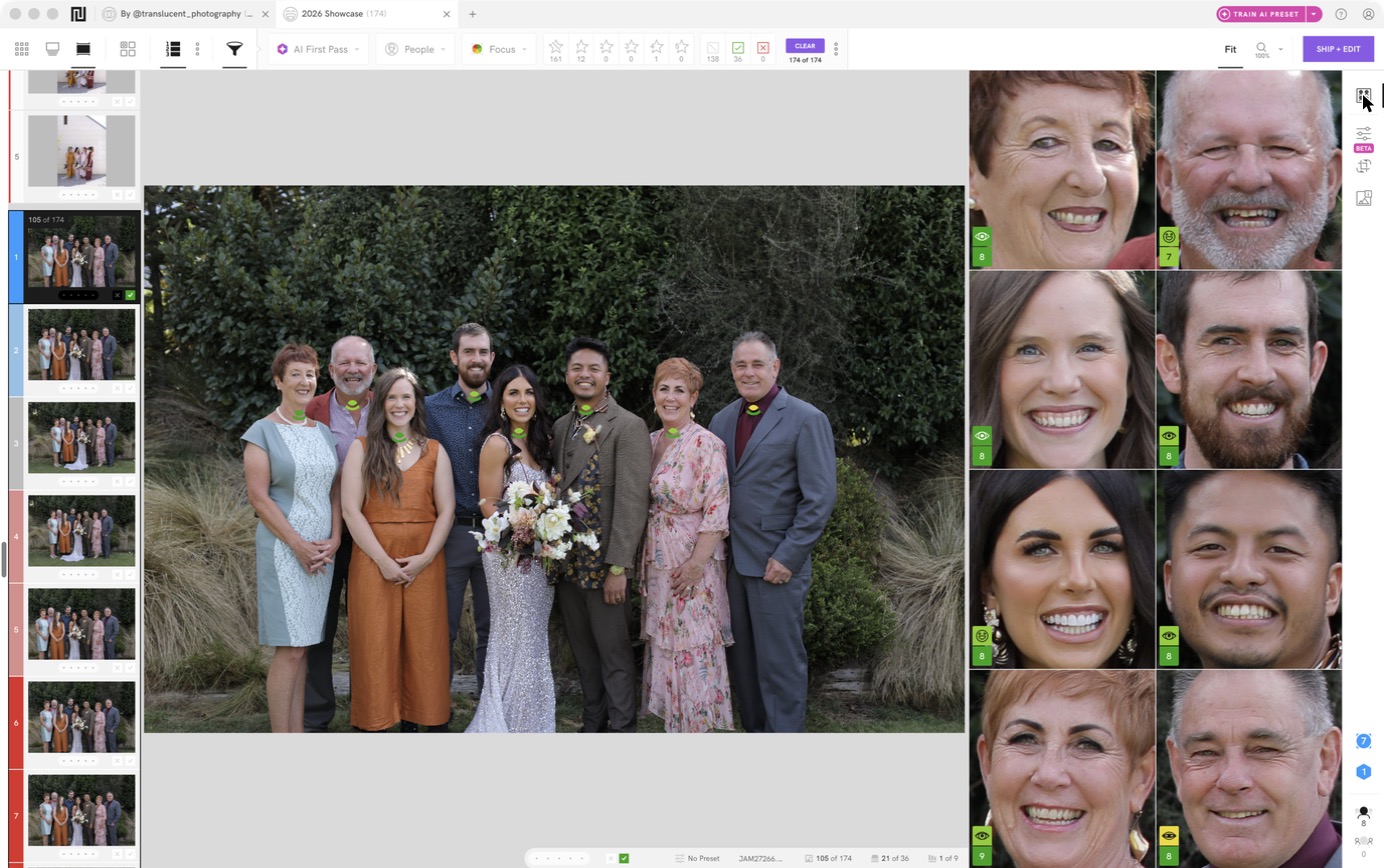
All four are part of Advanced AI Culling, on Standard, Premium and Ultra plans.
Automate: the first pass, focus and closed-eye checks, and grouping similar shots.
Keep hands-on: the final selection. AI can’t know which moment mattered most to this couple. You can, because you were there.
6. Editing
Consistency is what makes people recognise your work. “Consistency makes a person fall in love with your style,” says James. Editing every image by hand across changing light makes that consistency hard to keep.

The fix is a baseline edit applied automatically, then your own fine-tuning on top. Narrative applies an AI Preset as you ship your selects to Lightroom Classic or Lightroom CC, so they arrive already edited. Personal AI Presets are trained on your own edited photos and keep learning from your corrections in Lightroom Classic. They’re on Premium and Ultra plans. If you edit in Capture One, you can ship your selects and star ratings there on a Mac, but AI Presets only apply in Lightroom. Ely, who has shot more than 650 weddings, still reviews every delivered set by hand after it arrives pre-edited.
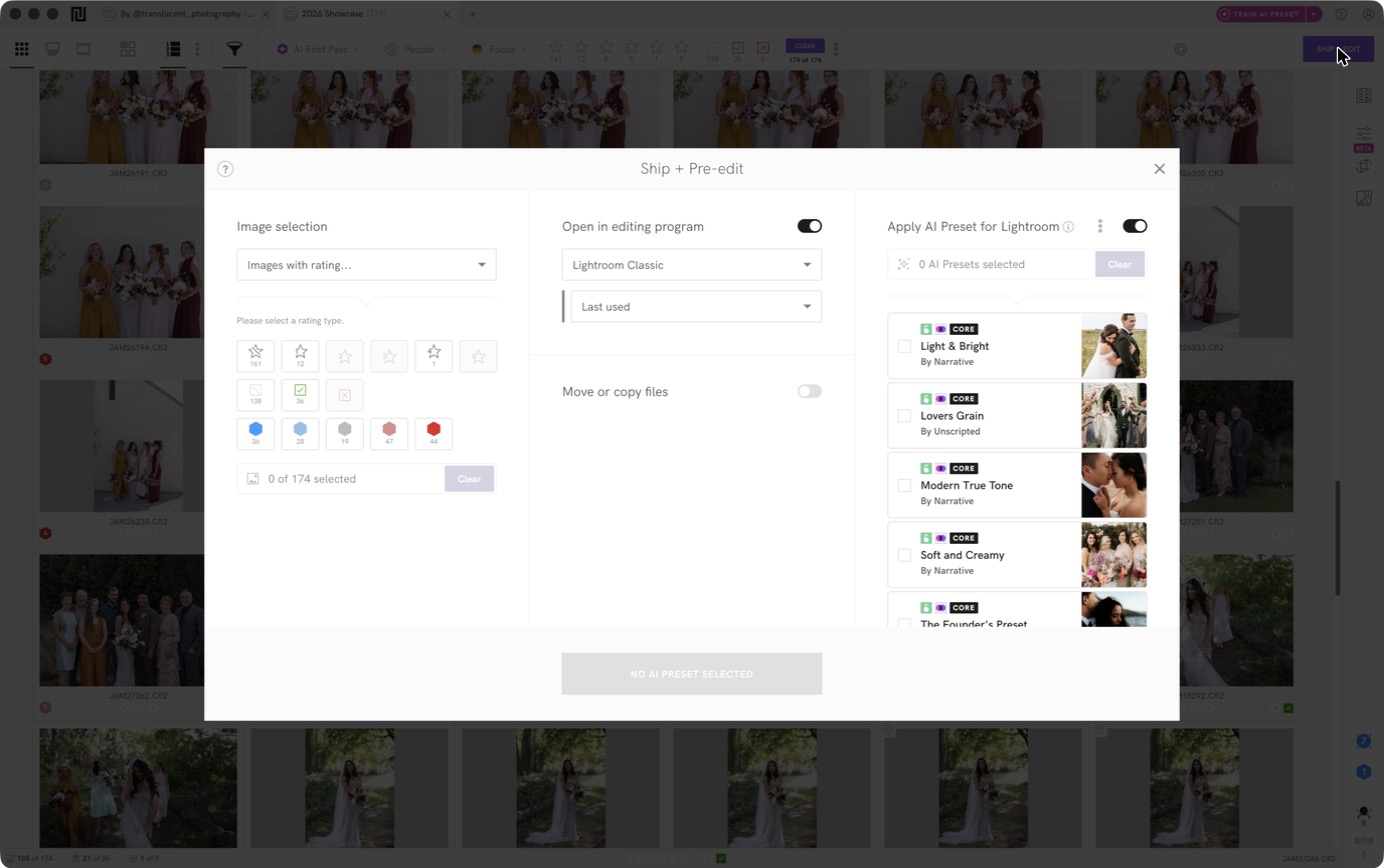
Automate: the baseline edit across the whole gallery.
Keep hands-on: hero images, skin retouching and anything your style needs a human eye for.
7. Review and delivery
Delivery is your last impression and your best source of referrals. Gallery platforms such as Pixieset and Pic-Time handle upload, the delivery email and print sales in one place. If you need client sign-off before delivery, see how Peakto handles review and validation after culling.

Albums take longer. Album design software like Fundy Designer can build a first draft from your selects, and your lab handles print.
Automate: gallery upload, the delivery email, print ordering and album drafts.
Keep hands-on: album image choices and the couple’s final review.
8. Follow-up
The wedding is over. The relationship isn’t. A happy couple can lead to an anniversary session, a referral, or a friend’s wedding.
Automate: a review request a week after delivery, a refer-a-friend email, and an anniversary check-in a year later. Email tools like Flodesk or Kit can run these on their own once they’re set up.
Keep hands-on: a short personal thank-you. It takes two minutes and couples remember it.
Where to start
Don’t rebuild everything at once. Write down every step from enquiry to follow-up, then mark each one: automate, keep, or delegate. Start with the stage that costs you the most hours. For most wedding photographers that’s culling and editing, because time saved there turns straight into capacity for more bookings.
If you want to test that on a real wedding, Narrative has a free trial.
FAQ
What can you automate in a wedding photography workflow?
Most of the admin: enquiry replies, contracts, invoices, payment reminders, questionnaires, backups, the first culling pass, baseline edits, gallery delivery and follow-up emails. The creative decisions stay with you: what to shoot, which images tell the story, and your final edit.
What software do wedding photographers use?
Usually one tool per stage: a CRM (HoneyBook, Dubsado, Studio Ninja), culling software (Narrative), an editor (Lightroom Classic, Capture One), a gallery platform (Pixieset, Pic-Time) and an email tool (Flodesk, Kit).
Does AI culling take away creative control?
It depends on the tool. Fully automatic culling makes the picks for you, and then you have to check them. Narrative takes the other approach: it surfaces the strongest frames and flags problems, and you make every final call.
What’s the right order for a photography workflow?
Enquiry, booking, planning, shoot, backup, cull, edit, review, deliver, follow up. Backup always comes before culling. Never format a card until the copy is confirmed.
Content