How People Filter changes coverage checking on high-volume shoots

Tuesday, September 1, 2026
Three days after the wedding, a message comes in from your client: "Did we get enough of the two of us together? And is my mom in enough of the family shots?" You'd need a full re-scroll of the gallery, unless you use Narrative's People Filter.
The problem
High-volume wedding and event shoots don't fail on photo count. A shoot can run to thousands of frames and still leave you unsure whether you got enough of the people who actually mattered: the couple together, the grandmother who flew in, the bridal party, a keynote speaker across every session they appeared in.
That question usually doesn't get answered until the cull. And the only tool most photographers have to answer it is scrolling the full gallery, person by person, hoping they don't miss a frame in a folder of thousands.
What People Filter does
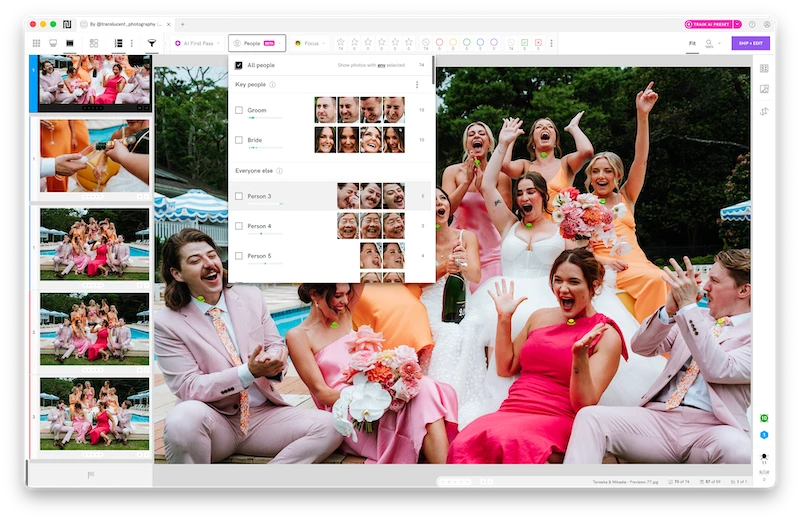
People Filter lets you filter a shoot by one person or a combination of people, and see how many frames each of them appears in.
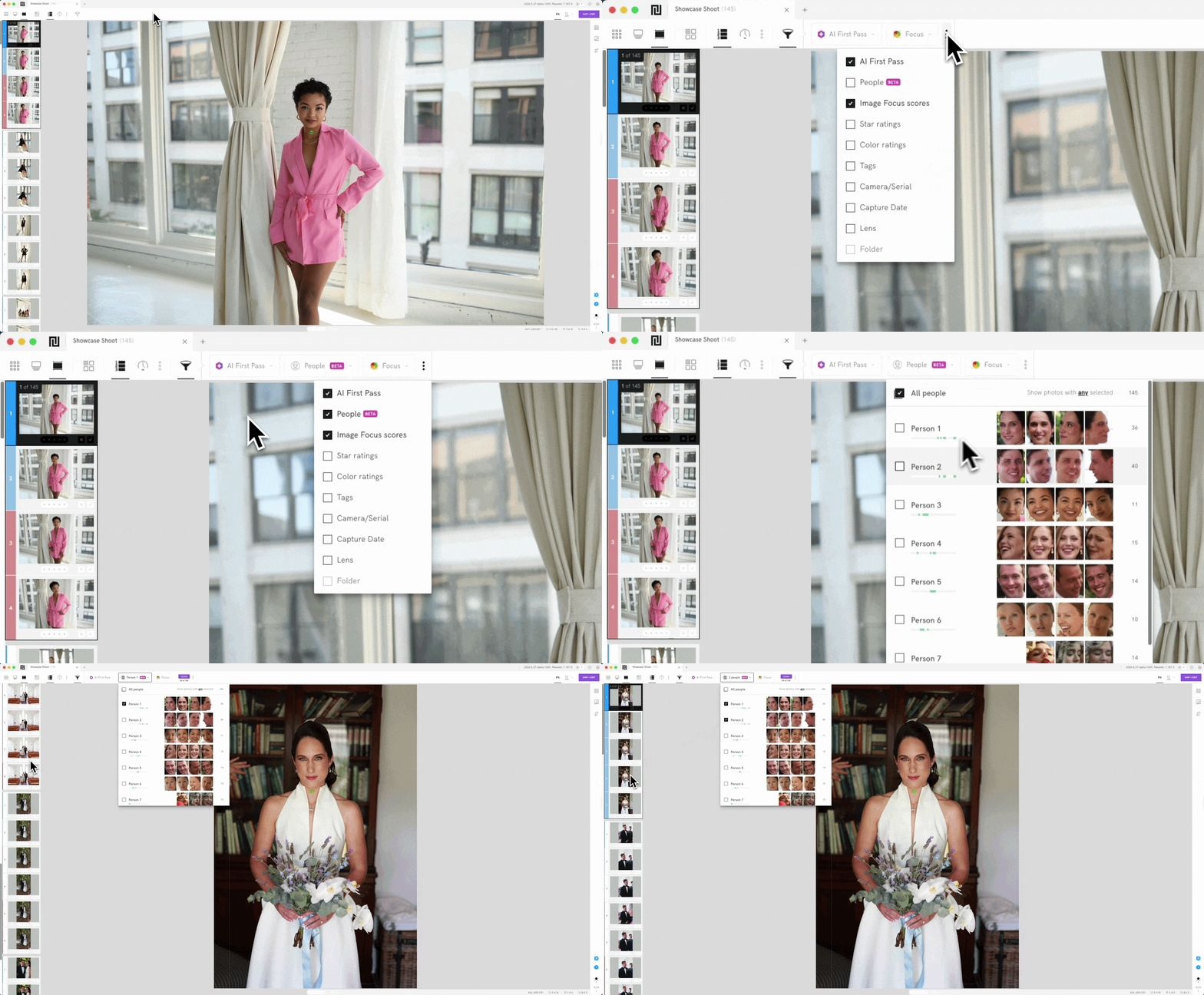
The People Filter drop-down panel is located next to the AI First Pass option on the menu bar. Activate or deactivate it by clicking the three-dot icon on the menu bar.
Every detected face gets a default label like "Person 1" or "Person 2," which you can rename to an actual name or a description like "the bride" or "bride's mom"
Prominently featured people show by default as "key people." Everyone else stays filterable too, just tucked behind a Show ungrouped people button so the main list doesn't get cluttered
You can filter by one person to see all their photos and how many they're in. You can also filter by multiple people to see photos in which they all appear together.
Faces in the background that are intentionally out of focus won't be picked up. It works on prominently featured people, not every face technically present in a frame.
Workflow walkthroughs
Coverage checking with People Filter can happen at a few points: before delivery as a final check, mid-cull to catch a gap early instead of at the end, or after delivery when a client asks for more of someone specific.
Wedding coverage. Before delivery, a shooter filters for the couple together to confirm they have enough joint shots, then checks the bridal party and immediate family individually. When a parent later asks "can you send everything with my sister in it," it's a filter, not a search.
Event coverage. At a multi-track conference, an event photographer filters by speaker to confirm every session they were part of got covered, without cross-referencing a schedule against thousands of unsorted frames.
People Filter also works well for building a sneak peek focused on one subject: filter for the person, pull the highlights, done in minutes instead of hand-picking from the full shoot.
People Filter works across all shoot types, including families and headshots. It's most useful where multiple people's faces are the main focus of the shoot, not just present in the background. That's why this piece focuses on high-volume wedding and event coverage.
Combine it with your existing rating and scene workflow: filtering narrows the pool, your usual rating pass still makes the final call.
Getting the most accurate results
A face angled too far from camera, or mostly hidden (whether from the angle or blocked by someone or something else), may not register. Treat filter counts as a strong starting point, not a guaranteed final tally, on shots where the subject isn't front and center.
FAQ
Is People Filter still in Beta? No, it's out of Beta.
Which plans include it? Standard plans and above.
Does it work on large group shots? Same limits as anywhere else: faces angled too far away, or mostly hidden by someone or something else, may not register, which gets more likely as a group gets bigger.
💜 If you're ready to spend less time sorting through thousands of images and more time crafting the story, try Narrative with free trial.