Top 5 Photo Mechanic Free and Paid Alternatives (2026)

Elli Kim Content
Tuesday, July 28, 2026
Photo Mechanic built its reputation on speed at ingest: fast previews, fast tagging, fast triage. But ingest speed and culling speed aren't the same thing, and for most photographers, the real time sink isn't getting images onto a screen, it's everything that happens after. That's the gap the AI-assisted tools below are built to close.
The strongest Photo Mechanic alternatives in 2026 split into two groups. Dedicated photo culling tools such as Narrative flag focus, closed eyes, and duplicate frames automatically as a core feature. Adobe Lightroom now has its own assisted culling feature built in, while traditional viewers like ACDSee Photo Studio Ultimate and Adobe Bridge remain solid manual options.
In this article:
Dedicated Culling Tools
Classic Viewers and Editors
Which Should You Choose?
Frequently Asked Questions
Dedicated Culling Tools
These tools don't just help you flip through images faster. They flag focus issues, closed eyes, and duplicate scenes so you're choosing between your best shots instead of hunting for them frame by frame.
1. Narrative
The single biggest difference between Narrative and other dedicated culling tools is that Narrative is designed to not make creative decisions for you.
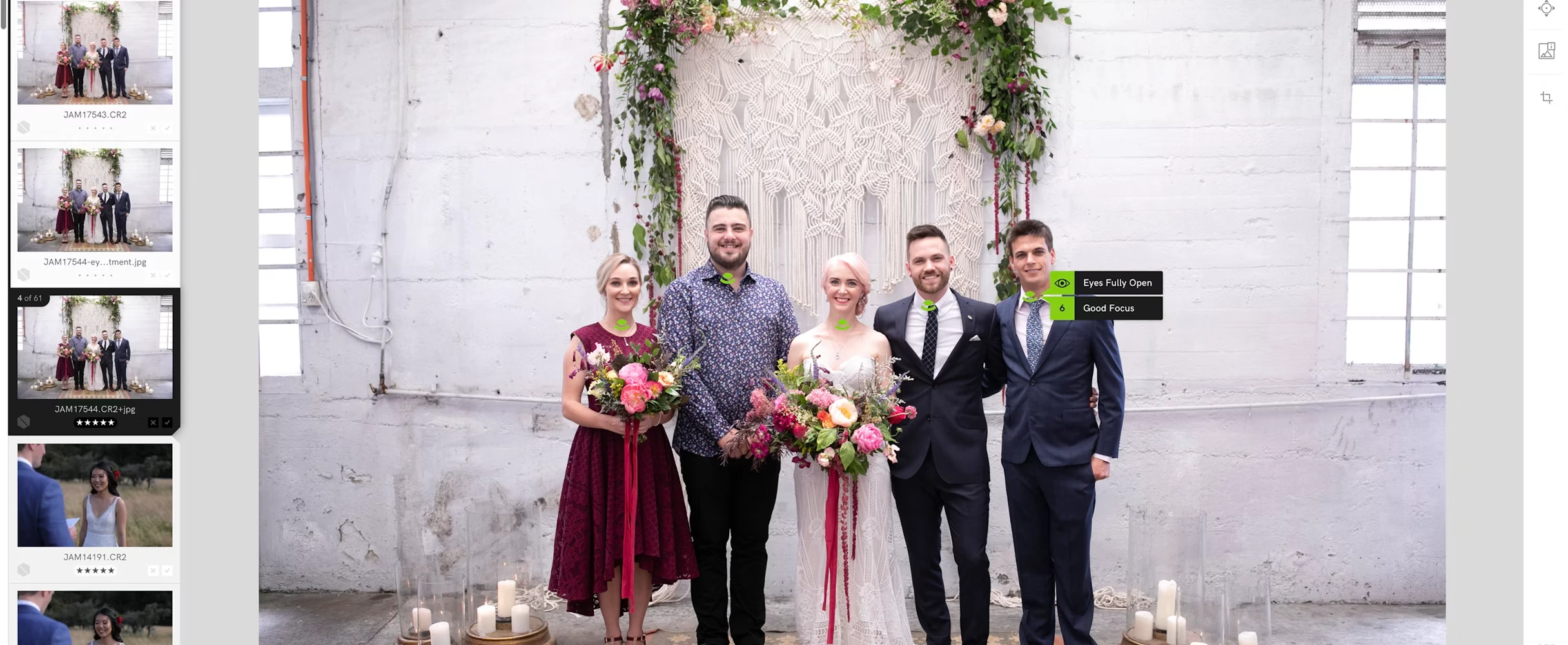
The AI surfaces the technical problems, focus, closed eyes, duplicate scenes, so you're the one choosing between your best shots, not scrolling past a thousand near-identical frames to find them. That distinction matters when it comes to curating your selects that reflect your creative vision.
Features:
3-second RAW import
with virtually no load time between images once your project is in
Eye and Focus Assessments
that flag closed eyes or soft focus before you waste time zooming in
Close-ups Panel
for instantly checking every face in a group shot at once, especially useful for weddings and portrait sessions with more than a couple of subjects
Scenes View
that groups near-duplicate frames so you compare variants instead of scrolling past them one at a time
Offline processing
so a hotel Wi-Fi dead zone or a flight home doesn't put your workflow on hold
Ship to Lightroom, Photoshop, and Capture One
with your star ratings and color labels intact
Pricing: Four plans, Lite ($10), Standard ($20), Premium ($40), and Ultra ($60) per month billed annually. Full breakdown on the pricing page.
2. Aftershoot
Aftershoot is an AI-powered culling tool that combines image editing with client-facing gallery options. If you have multiple photographers and want consistent settings across your entire studio, rather than relying on the judgment of individual photographers, this is the tool for you.
Pricing: Culling, editing, and retouch bundle run $55 per month (or $540/year).
Classic Viewers and Editors
They remain solid, well-established options if you want something simpler, want to stay inside one app, or aren't ready for a dedicated culling-first tool.
3. ACDSee Photo Studio Ultimate
Formerly known simply as ACDSee Ultimate, ACDSee Photo Studio Ultimate handles culling, cataloging, and photo editing in one application, with customizable keyboard shortcuts to speed up review.
Pricing: $89/year subscription, or a perpetual license of $150 with one year of included updates.
4. Adobe Lightroom
Lightroom's assisted culling includes Face View (isolating each person in a shot to check eyes-open and sharpness), automatic stacking (surfaces the best of a batch of near-duplicate frames), and filtering out shots that are clearly over or underexposed or out of focus. Reception is mixed, praised for sports photography by some, seen as less refined than a dedicated culling-first tool by others, but worth trying if you're already a paid user.
Pricing: The standalone Lightroom plan is $11.99/month billed annually or $119.88/year prepaid.
5. Adobe Bridge
If you want to stay entirely inside Adobe's ecosystem without paying for anything extra, Adobe Bridge is the free option: a straightforward digital asset manager with no Creative Cloud subscription required, just a free Adobe ID. Features include keyword tagging, metadata editing, batch orientation adjustments, star ratings, and file organization for large shoots.
Pricing: Free, but some advanced editing tools such as processing RAW images require a paid subscription.
Which Should You Choose?
If you're shooting high volume and want the mechanical parts of culling handled without losing offline reliability, try Narrative's free trial. If you already pay for Lightroom and want some AI help without adding another app, its assisted culling feature is worth trying. f you shoot low volume and prefer to cull manually, ACDSee and Adobe Bridge are solid, fully manual options.
For a full side-by-side on how Narrative compares to the other major AI culling tools, visit our comparison page.
・・・
Related Questions
What is a free alternative to Photo Mechanic? Adobe Bridge is free and handles basic tagging and organization, though it doesn't include AI-assisted culling. Most AI culling tools, including Narrative, offer a free trial so you can test the workflow before subscribing.
Is Photo Mechanic better than ACDSee? Photo Mechanic is faster for pure ingest and tagging. ACDSee Photo Studio Ultimate adds cataloging and full photo editing in one app, but like Photo Mechanic, it doesn't include AI-assisted culling.
Is Photo Mechanic better than Lightroom? Photo Mechanic is built for speed at ingest and triage. Lightroom is built for organizing and editing. Many photographers use Photo Mechanic, or an AI culling tool, for the first pass, then Lightroom for the edit.
Does Photo Mechanic have AI culling features? Not as of 2026. Photo Mechanic offers fast ingest, tagging, and manual flagging, but no built-in AI assessment of focus, closed eyes, or duplicate scenes. That gap is exactly what the AI-powered tools on this list are built to fill.
💜 Narrative's culling and editing tools give you back the time for the creative decisions that matter. Start with free trial, no credit card required.
Content